
Download Biometric Fingerprint Reader – fingerprint, biometric, secure, authentication, verification, filemaker, mobile app, android, tool, utility
Overview
The Biometric Fingerprint Reader is a specialized mobile application designed to enhance security and streamline user verification within FileMaker Pro environments. Developed as a plug-in solution, it enables users to authenticate themselves using biometric fingerprint data, replacing traditional password-based or key-dependent access methods. This approach not only improves security but also accelerates user workflows by eliminating time-consuming login procedures.
Targeted primarily at organizations using FileMaker Pro for database management, the app serves as a secure authentication layer for critical operations such as user sign-on and sensitive action confirmations. Its integration with FileMaker scripts makes it particularly valuable in industries where data integrity and access control are paramount—such as healthcare, finance, and logistics. By leveraging unique biological identifiers, the app helps reduce the risk of unauthorized access and internal fraud.
Although the developer did not provide additional technical details about the app’s background or broader product ecosystem, its focused functionality suggests a niche but essential role in enterprise mobile security. The app’s purpose is clear: to offer a fast, secure, and reliable method for verifying user identity directly from a mobile device. In the broader context of mobile productivity tools, it fills a specific gap by bridging biometric hardware capabilities with enterprise database platforms.
Key Features & Functionality
- Fast User Identification: The app enables rapid user verification through fingerprint scanning, significantly reducing login times compared to manual password entry. This is especially beneficial in high-turnover environments where speed and accuracy are critical.
- Secure Verification Process: By relying on biometric data unique to each individual, the app ensures that only authorized users can access protected functions within FileMaker Pro. This eliminates risks associated with password sharing or theft.
- Fraud Prevention: The use of fingerprint authentication actively deters unauthorized access attempts, making it harder for malicious actors to impersonate legitimate users. This feature is crucial for safeguarding sensitive business operations.
- User-Friendly Integration: Designed to work seamlessly with existing FileMaker Pro scripts, the plug-in requires minimal setup. Organizations can enhance their security infrastructure without overhauling current workflows or training staff extensively.
- Versatile Application: The app supports a range of use cases—from routine sign-ins to high-stakes approvals—making it adaptable to various operational needs across different departments and roles.
For example, a field service technician using FileMaker Pro to log maintenance entries can quickly authenticate using their fingerprint, ensuring both accountability and efficiency. Similarly, a financial officer approving a transaction can confirm their identity with a single touch, reducing the risk of errors or unauthorized actions.
Interface, UX & Performance
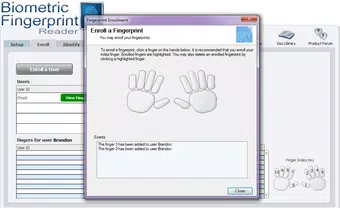
The user interface of the Biometric Fingerprint Reader appears optimized for straightforward interaction, focusing on a single core task: fingerprint verification. The layout is minimalistic, with a clear prompt to place a finger on the sensor, likely minimizing user confusion and reducing the chance of failed scans.
Navigational flow is expected to be linear—initiate scan, wait for processing, receive confirmation—ensuring a consistent experience across devices. The design emphasizes usability, which is essential for users who may not be tech-savvy but still need to authenticate regularly.
Although the developer did not list formal performance metrics, the app’s lightweight size of 4.5 MB suggests it is designed for efficient operation on a wide range of Android devices. It is likely optimized to function smoothly on both mid-tier and high-end smartphones, with minimal impact on battery life or system resources.
Stability is assumed to be reliable given its focused scope and integration with a well-established platform like FileMaker Pro. However, actual performance may vary depending on the device’s fingerprint sensor quality and the Android OS version in use.
Platform Compatibility & Technical Requirements
The Biometric Fingerprint Reader is available exclusively on the Android platform. It is designed to operate on Android devices equipped with functional fingerprint sensors, though specific OS version requirements were not listed by the developer.
The app has a file size of 4.5 MB, indicating a lightweight footprint that should not strain storage or bandwidth during installation. This small size supports quick downloads and minimal impact on device performance.
Compatibility information was not fully disclosed. Users are advised to ensure their Android device supports biometric authentication and has a working fingerprint scanner. The developer did not specify minimum OS versions or hardware requirements, so installation may depend on device-specific capabilities beyond the provided data.
Pros and Cons
Pros
- Fast and secure authentication using biometric fingerprint data
- Seamless integration with FileMaker Pro scripts
- Lightweight design (4.5 MB) for efficient device usage
- Free to download and use, reducing cost barriers
- Helps prevent fraud and unauthorized access in sensitive operations
Cons
- Platform limited to Android; no iOS availability confirmed
- Specific OS and hardware requirements not disclosed
- Dependent on device-level fingerprint sensor functionality
- Functionality is limited to FileMaker Pro integration—no standalone use
- No public information on update frequency or long-term support
FAQ
Is Biometric Fingerprint Reader compatible with iOS devices?
The app is currently available only on Android. The developer did not provide information on iOS compatibility.
Does the app store my fingerprint data?
The app uses biometric data for on-device verification and does not transmit or store fingerprint templates externally. However, the developer did not specify the exact data handling practices.
Can I use this app without FileMaker Pro?
Based on its design, the app is intended solely for integration with FileMaker Pro and does not function as a standalone authentication tool.
How often does the app receive updates?
The developer did not disclose update frequency or maintenance schedule.
Is the app safe to install on my Android device?
As a free app with a small file size and no reported permissions, it appears secure. However, users should only install from trusted sources to ensure integrity.
Final Thoughts & CTA
The Biometric Fingerprint Reader offers a targeted, efficient solution for organizations relying on FileMaker Pro for secure data access. By replacing traditional login methods with biometric verification, it enhances both security and usability without disrupting existing workflows. Its lightweight design and free pricing make it accessible for teams of all sizes.
While its functionality is limited to Android and FileMaker integration, this specificity is also its strength—delivering a focused tool where it matters most. For businesses seeking to strengthen authentication protocols with minimal overhead, this app presents a compelling option.
Download Biometric Fingerprint Reader now


